What Marketing Agencies Actually Need in a Client Portal (And What Most Get Wrong)
June 2, 2026
What Marketing Agencies Actually Need in a Client Portal (And What Most Get Wrong)
You have six active clients. One is waiting on ad creative approval. Another just emailed asking where the content calendar is. A third has a question about a campaign you wrapped three weeks ago — and you have no written record of what they approved. Sound familiar? Most marketing agencies reach for a "client portal" to solve this. Some use ClickUp or Notion. Some use a shared Google Drive. Some use a combination of all three, plus Slack, plus email. And the chaos continues. The problem is not that agencies lack tools. It is that the tools they use were never built for marketing workflows in the first place.

Why Marketing Agencies Go Looking for a Client Portal
The search for a marketing agency client portal usually starts with a specific pain, not a general interest in better software. Something breaks. A client claims they never approved an ad that already ran. A file gets overwritten. An account manager leaves and takes half the client context with them. The agency realizes it has been operating on trust and tribal knowledge instead of documented, traceable processes.
The underlying problems are consistent across agencies of almost every size:
Approval chaos
An email that says "looks good" is not an approval. It is an opinion. Without a timestamped, logged record of what a client reviewed and confirmed, every dispute becomes a he-said-she-said situation.
Asset and file sprawl
Creative files in Google Drive. Strategy docs in Notion. Brand guidelines in a Dropbox link that expired. Clients cannot find anything, and neither can the team.
No single source of truth for campaign status
The agency knows what is live, what is in progress, and what is waiting on client feedback. The client almost never does. This disconnect is the root of most retainer friction.
Communication fragmentation
Feedback arrives in email, Slack, a comment on a PDF, and a voice note. Consolidating it takes longer than acting on it.
The Problem: Most "Portals" Are Just File Folders with a Login
When agencies search for a marketing agency client portal, they often land on generic project management tools. ClickUp, Notion, Basecamp, Monday.com — these are capable platforms built for general team productivity. They are not built for marketing workflows. There is a meaningful difference.
A generic tool gives you tasks, files, and a place to communicate. That is useful, but it puts the burden on the agency to build out every workflow from scratch — campaign structures, approval processes, content calendars, brief templates, branding repositories. Most agencies never get around to it. They set up a workspace, share it with a client, and it becomes another tab nobody checks.
The real issue is not the tool. It is what the tool assumes about your work.
Generic project management platforms assume you are managing tasks. Marketing agencies are managing campaigns, approvals, briefs, strategies, brand assets, content schedules, and client relationships — simultaneously, across multiple accounts. That requires a different kind of system.
White-labelling is another gap. Clients logging into a workspace that clearly reads "Powered by [Generic Tool]" is a small but real problem. It reminds the client that your agency is stitching together third-party software instead of running a polished, professional operation. Branding matters, even in the back office.
What a Marketing Agency Client Portal Actually Needs
Here is a practical checklist for evaluating any platform you are considering. These are not nice-to-haves — they are the features that determine whether the tool actually improves your workflow or just adds another login to manage.
Campaign visibility for clients
Clients should be able to see the status of every active campaign without having to ask. What is live, what is in review, what is waiting on their input. This alone eliminates a significant portion of the "just checking in" emails agencies receive every week.
Structured approvals with an evidence trail
Not a checkbox. A logged, timestamped record of what was submitted, when the client reviewed it, what comments they left, and whether they approved or requested revisions. This protects the agency and gives the client complete clarity on what they have and have not signed off on.
A shared content calendar
Both the agency and the client should be able to see what is scheduled, what is pending approval, and what has been published. This keeps everyone aligned on timing and reduces last-minute surprises on either side.
Briefs, strategy, and branding in one place
Campaign briefs should live next to the campaigns they inform. Brand guidelines and assets should be a click away from the work they govern. Separating these into different tools means someone on the team is always working from outdated information.
Per-item messaging and commenting
Feedback on a specific campaign or creative should be attached to that item — not dropped into a general inbox where it gets mixed with invoicing questions and onboarding messages. Contextual communication is faster and far less error-prone.
White-label branding
Clients should see your logo and your colours, not a third-party platform's interface. Your workspace should feel like your agency's software, because professionally it is.
Performance and reporting built in
Reports should live in the same workspace as the campaigns they describe. Exporting data into a separate dashboard and emailing a PDF is a workflow from 2015. Clients expect live or near-live visibility into how their investment is performing.
A client-side CRM
For agencies running lead generation or demand generation work, having a CRM workspace for the client — managed by the agency — keeps lead data, pipeline, and marketing activity in the same environment. No more exporting CSVs between platforms.
The Approval Problem Is Bigger Than Most Agencies Realise
Approval disputes are one of the most common reasons marketing retainers end badly. An ad runs that a client says they never approved. A piece of content goes live on a date the client says they pushed back. The agency has no documentation. The client is unhappy. The relationship ends with neither side fully trusting the other.
This is not just an awkward conversation — it can become a financial dispute. Agencies that cannot prove what was approved and when are exposed. Those that can are protected. The difference is an evidence-based approval system versus an email thread.

A proper approval workflow has three components working together. First, a preview environment where the agency uploads the creative — the ad, the social post, the email, the landing page — and the client can view it in context before it goes live. Second, a structured response mechanism where the client can approve, request revisions, or flag concerns with comments attached directly to the item. Third, a logged record that neither party can alter after the fact, showing exactly what was submitted, what feedback was given, and what the final decision was.
When these three components are in place, disputes become rare. When they are missing, disputes are inevitable.
How Kepteasy Approaches Marketing Agency Workflows
Kepteasy was built from real service business experience — not as a generic productivity tool that agencies are expected to bend to their needs. The marketing workspace was designed specifically around the workflows agencies run every day, with dedicated sections for the things that matter most.
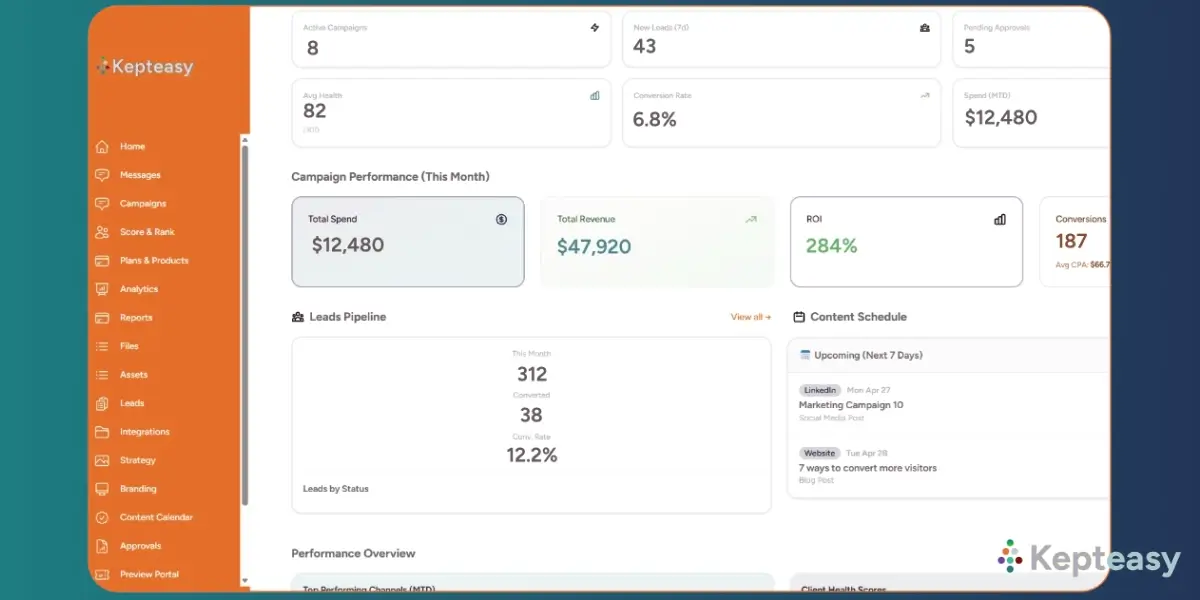
The marketing workspace includes Campaigns, Briefs, Strategy, Branding, Content Calendar, Approvals, Preview Portal, Performance, Analytics, Reports, Assets, Files, Messages, and Leads. These are not generic labels on blank pages — they are purpose-built sections that give both the agency and the client a clear, structured place for every part of the engagement.
| Workflow Need | Generic Tool | Kepteasy Marketing Workspace |
|---|---|---|
| Campaign management | Generic task board | Dedicated Campaigns section with client visibility |
| Creative approvals | Email or comment thread | Preview Portal with logged approvals and revision requests |
| Content scheduling | Separate calendar tool or spreadsheet | Shared Content Calendar with approval status |
| Brand and asset management | Shared folder link | Branding and Assets sections inside the client workspace |
| Reporting | Exported PDF sent by email | Performance, Analytics, and Reports accessible in workspace |
| Agency branding | Third-party logo visible to clients | Fully white-label — your logo, your colours, your workspace |
Agencies have full control over page visibility, so if a client does not need to see the Leads section or the Strategy workspace at a given stage, it can be hidden. The workspace stays clean and relevant rather than overwhelming clients with sections they are not using yet.
The white-label setup means clients see the workspace as their agency's software — your branding, your colours, your name. There is no mention of Kepteasy in the client-facing environment. Agencies operating at a professional level should look like they have built something of their own, and Kepteasy makes that straightforward.
For agencies that also handle SEO, website work, or broader digital strategy, Kepteasy's main web application includes additional tools for those disciplines. Pros and agencies have access to both environments, so everything from campaign management to keyword tracking can exist under one platform and one client login.
A "portal" is what people call it. A marketing workflow system is what agencies actually need.
Kepteasy is built for the second. The distinction is not semantic — it is the difference between a shared folder with a login and a structured environment where campaigns are tracked, approvals are documented, clients are informed, and agencies are protected.
Who This Kind of Platform Is Built For
There is no point pretending every platform is right for every agency. A 200-person agency with a dedicated ops team and an enterprise budget will have different requirements — and probably already has a complex stack built around them. That is not who this article is for.
This kind of platform fits best when:
You are a solo agency owner or small team managing multiple client retainers simultaneously
You have outgrown the Google Drive and email combination but do not need a bloated enterprise suite
You want clients to have a professional, branded experience without building custom software
You need documented approval records to protect your agency from scope creep and retainer disputes
You are managing marketing workflows specifically — not just general project tasks
Conclusion
Most agencies searching for a marketing agency client portal are actually searching for something more specific: a system where campaigns are visible, approvals are documented, clients feel informed, and the agency has a defensible record of the work they delivered. A file folder with a login does not solve that. A generic task manager does not either.
The agencies that retain clients longest are not always the ones doing the best marketing work — though that helps. They are the ones whose clients always know what is happening, always know what they have approved, and always feel like they are working with a professional operation. The right platform makes that possible without adding ten hours of admin to your week.
Frequently asked questions
What is a marketing agency client portal?
A marketing agency client portal is a shared digital workspace where an agency and its clients collaborate on campaigns, exchange files, review deliverables, and track project status. At minimum it provides a login-protected environment. At its best, it includes dedicated workflows for approvals, content calendars, briefs, reporting, and campaign management — all in one place rather than scattered across multiple tools.
Why can't a marketing agency just use ClickUp or Notion as a client portal?
They can, but these tools are built for general team productivity, not marketing agency workflows. Agencies using them as client portals typically have to build every workflow from scratch — campaign structures, approval processes, brief templates, content calendars. Most never fully complete the setup. The result is a workspace that clients rarely check and agencies rarely maintain. A purpose-built marketing platform removes that configuration burden.
How important are approval records for a marketing agency?
Very important. Approval disputes are one of the most common causes of retainer breakdowns. Without a timestamped, logged record of what a client reviewed and confirmed, any disagreement about what was authorised becomes impossible to resolve cleanly. A proper approval system protects the agency legally and operationally, and gives the client confidence that their decisions are documented and respected.
Does Kepteasy's marketing workspace show clients what they have and have not approved?
Yes. The Preview Portal and Approvals sections are designed to give both the agency and the client a clear record of every item submitted for review. Clients can see what is pending their input, what they have approved, and what is in revision. Agencies have a documented trail for every item across every client account.
Is Kepteasy white-label for marketing agencies?
Yes. Agencies can apply their own logo and brand colours to the workspace, and clients see the platform as the agency's own software — there is no Kepteasy branding visible in the client-facing environment. This gives smaller agencies a polished, professional presentation without the cost of building custom software.
Can a marketing agency hide sections of the workspace that a client does not need?
Yes. Kepteasy includes page visibility controls that let agencies show or hide specific sections of the workspace per client. If a client does not need access to the Leads CRM or the Strategy section at a given stage, those pages can be hidden. This keeps the workspace focused and reduces confusion for clients who do not need to see every part of the system.
Ready to see what a marketing-specific client workspace actually looks like in practice? Kepteasy is free to explore — no credit card required.
Try Kepteasy free Justin Mayer
Founder, Kepteasy
Justin Mayer
Founder, Kepteasy